
Agent overview
Environment & secrets
Store variables in Beav and choose how external Agents may use them.
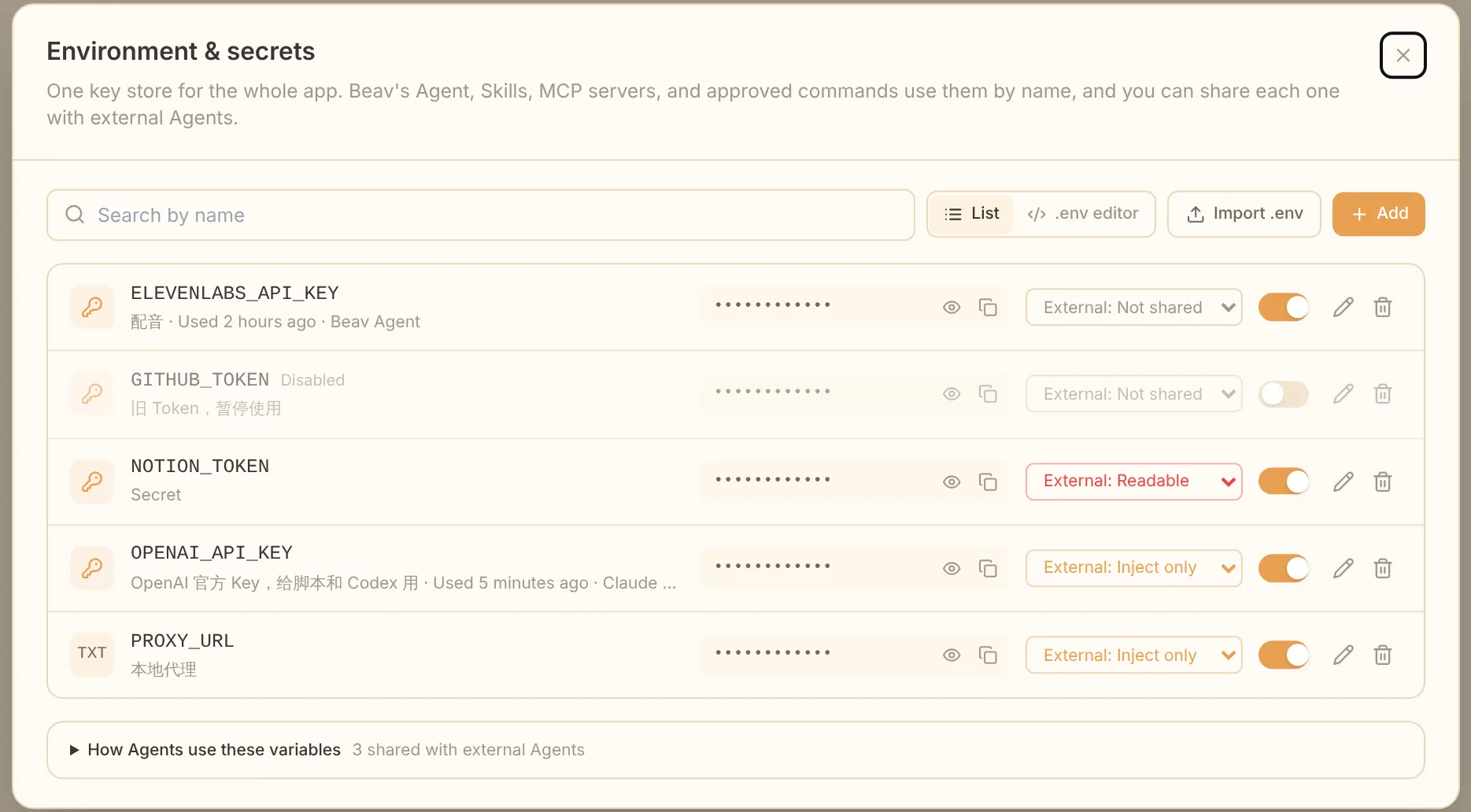
Open Environment & secrets from the account menu at the bottom left of Beav or from MCP connection settings. Choose Secret when you add an API key or password. Click a variable name to edit its name, value, note, or access level. Disabling a variable makes it unavailable to every Agent without deleting it.
Bulk edit and import
The .env editor shows variables as text. •••••••• keeps an existing Secret value; replace it to update the value. A # comment directly above a variable becomes its note. Removing a line deletes that variable, so check the deletion notice before saving. Import .env merges without deleting existing variables.
External Agent access
| Level | Effect |
|---|---|
| Not shared | External Agents cannot see it; this is the default for variables created from the account menu |
| Inject only | Agents see the name and note and can use it in local commands through secrets_run; this is the default for variables created or imported in the library |
| Readable | Agents can also retrieve the plain value with secrets_read |
An external Agent can call secrets_list for shared names and notes. Inject only masks the original value in ordinary command output, but a client allowed to run commands could still obtain or forward an injected value. Share only with tools you trust. Add missing keys in Beav and tell the Agent the variable name; do not paste values into a chat.