

Key takeaways
- In Bilibili, tap share and copy the link. In the Beav knowledge base, click + next to Knowledge Base, choose Add link, paste the link or the whole share text and save. You don't pick a platform, and b23.tv short links are resolved for you.
- Bilibili links are read through the capture service, which needs sign-in or a configured capture API and consumes quota according to its rules. A video you already saved is not saved twice, and a failed link stays in the box.
- Found something on your phone? Scan a QR code and submit several links to your computer. Bilibili is not supported by the Extract Video Script or Download from Links mini apps, so batches go through the phone.
Good Bilibili videos tend to be long: a fifteen-minute explainer, a half-hour review, with structure and arguments worth studying more than once. The usual move is to favorite it or add it to Watch Later. By the time you go looking, the folder holds hundreds of videos with titles you no longer remember, and if the uploader takes a video down, the favorite is just a dead entry.
Saving to Beav's reference library keeps a complete entry instead: the title, video, uploader, source link and view count together, on your own computer. You can file it, search it, break it down and hand it to the AI when you write. This is where a material library starts.
Who it is for
- Creators of explainers, reviews and tutorials who keep collecting benchmark videos from Bilibili.
- Social media managers adapting the topics and storytelling of long Bilibili videos for RedNote (Xiaohongshu) or Douyin.
- Anyone who watches Bilibili on the phone and wants good videos to land on the computer.
How to use it
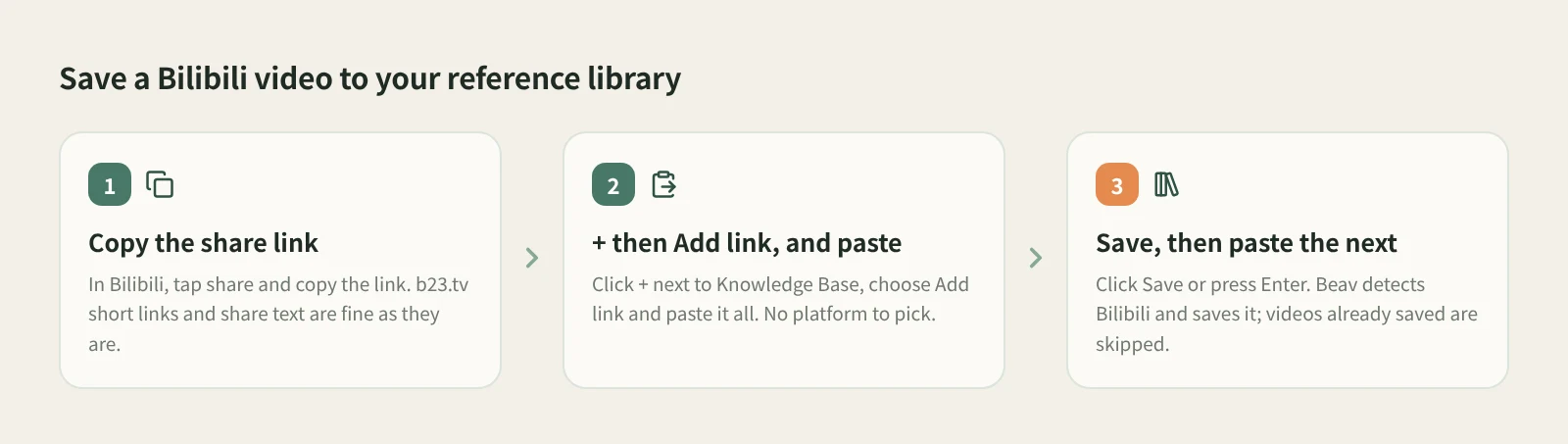
- Copy the share link. Open the video in Bilibili, tap share and copy the link. On the phone you usually get share text with a b23.tv short link inside; keep all of it.
- Open Add link. At the knowledge base root or in a personal folder, click + in the title bar or next to Knowledge Base on the left, then Add link.
- Paste and save. Paste it and click Save or press Enter. Beav resolves the short link, detects Bilibili and saves to the root of the current space's knowledge base. The dialog shows the detected platform and clears, ready for the next link. One link at a time.
- Handle failures. If saving fails, the dialog keeps the link and shows the reason; fix it and save again. Uploader profile links are not supported and are reported right away, so use a single video's link.
- Find it in the knowledge base. The card shows the view count and the uploader. While the video is still coming down in the background, the card shows Downloading.
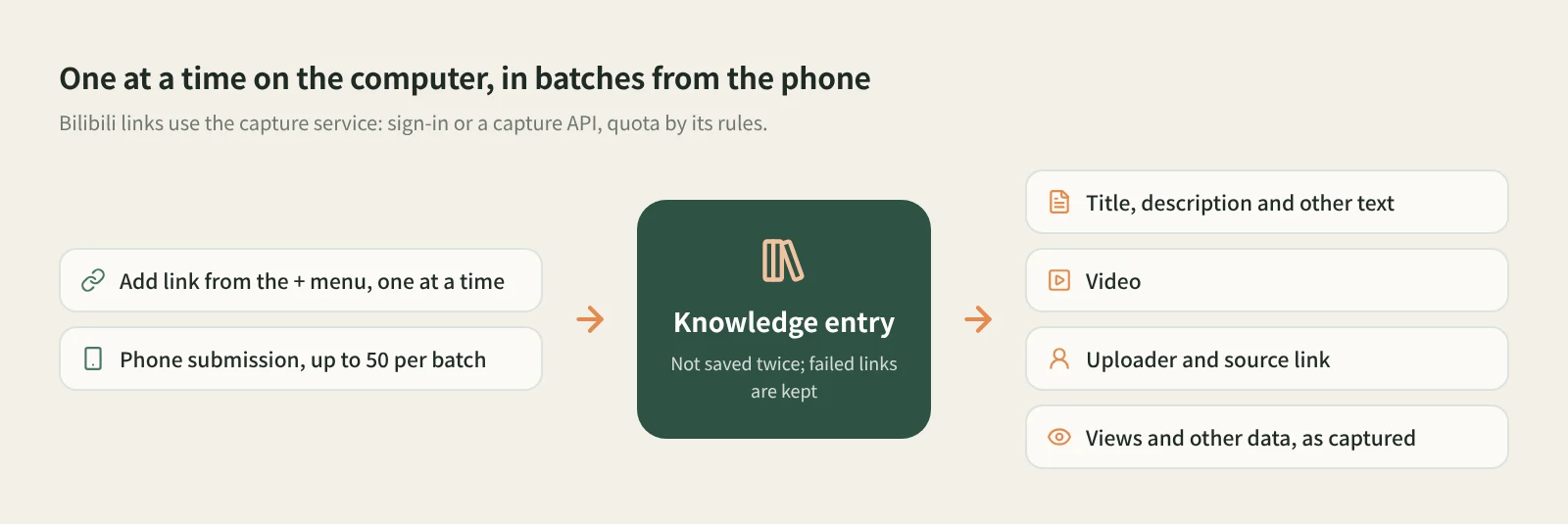
Other entry points. For videos found on your phone, click Phone Upload in the desktop knowledge base, put the phone and computer on the same Wi-Fi, scan to pair, then paste several links on the collection page in the phone browser and submit, up to 50 per batch. See phone and computer pairing. If you've connected an external agent such as Codex or Claude Code to Beav on your computer, you can also ask it to read a Bilibili link into the knowledge base; that uses Beav's social APIs and may consume quota.
What do you keep? A knowledge base entry with the title, description and other text, the video, the uploader and the source link. View counts and other numbers are whatever the capture returned. Cards show the data as saved, not a live count; missing numbers are left blank, and durations or bullet-comment counts are never made up.
What uses quota? Bilibili links from Add link or the phone are read through the capture service, which needs sign-in or a configured capture API and consumes quota according to its rules. Clicking Decompose later uses model quota on top of that.
Once a video is saved and you want to take it apart, click Decompose on the entry yourself. Saving never starts a breakdown.
How it compares with the usual ways
| Bilibili favorites and Watch Later | Downloader apps and sites | Beav reference library | |
|---|---|---|---|
| Effort to save | One tap in the app, the fastest | Copy the link, download a file | Copy the share text, paste, save; batches of 50 from the phone |
| What you keep | A favorite on the platform | Usually just the video file | Title, video, uploader, source link and captured data |
| If the video is taken down | Usually won't play | File remains; you track the source | Saved content stays in your library with the link |
| Finding it again | Scroll your favorites | Hunt through file names | Folders and search in the knowledge base |
| What comes next | Rewatch in the app with bullet comments and replies | Edit and sort files yourself | Decompose by hand; drag into a chat for the AI to cite |
| Cost | Free | Depends on the tool | Capture service quota, by its rules |
Bilibili favorites cost nothing to use, and you rewatch with the bullet comments and replies around the video, which a saved copy doesn't give you. If all you want is a video file, a downloader is often more direct. Beav is for treating Bilibili videos as long-term material: you want the source, the uploader and the numbers, not just a file, so you can study and reuse them later.
Limits and notes
- The two mini apps don't support Bilibili. Extract Video Script and Download from Links cover other platforms for now and won't process Bilibili links. To save several at once, use phone submission.
- Add link takes one video at a time. It doesn't accept uploader profiles and is not a bulk import. The entry is not shown in shared spaces, account profiles, subscription views or local source folders.
- What can be read has limits. It depends on the platform, the capture service, account permissions and quota. "Received" on the phone only means the computer accepted the task, and phone submission needs Beav running on a computer on the same local network.
- Long videos can hit a size limit when decomposed. Video over the video-understanding size limit is first compressed to a low-resolution copy; if it's still too large, the shooting script is skipped with a reason and the other results are kept.
- Saved videos are for your own research. Rewriting should learn structure and storytelling, not copy. Ask the uploader before republishing, commercial use or reusing their video.
Next steps
- To break saved videos down and rewrite them as your own content, read saving, breaking down and rewriting Bilibili videos.
- To see which other platforms the same box handles, read one box for every platform. For why collecting matters at all, read the series overview, "Accumulation Is the Moat".
- Full reference: add a link to save a single post and upload links from your phone.
Applies to Beav desktop 2.9. Checked 2026-11-01.