


Key takeaways
- TikTok isn't on the supported list for Add link in the knowledge base. To collect in bulk, use the Download from Links mini app: one link per line or a whole share text, up to 20 per batch, duplicates removed, and you can mix in Xiaohongshu (RedNote), Douyin and WeChat Channels links.
- Choose Knowledge in this space and the text, source and media are saved together as entries you can file, search and decompose later. This computer only packs a ZIP and adds nothing to your library. Each item shows its own status, and failed ones can be retried individually.
- For just the spoken words, Extract Video Script transcribes in bulk, as plain text or SRT, and can save to the knowledge base too. Reading links goes through the capture service and transcription uses a transcription model, both consuming quota according to their rules.
If you run an overseas account or study what works abroad, the usual move while scrolling TikTok is tapping Favorites. A few hundred saves later, when you sit down to compare against competitors, you're opening them one by one trying to remember why each took off, and anything the creator deleted is gone. The other route is a downloader site, one video at a time, which leaves you with a folder of MP4s and no creator, caption or link attached.
Beav collects viral TikTok videos into your reference library in batches instead. Paste 20 links at once, and the video, text and source are kept together, in the same knowledge base as everything else you've collected. Competitive research stops depending on memory and starts depending on a library you can browse, search and break down. This is the first step of building a material library.
Who it is for
- Creators running TikTok accounts who collect benchmark videos by niche in bulk.
- Cross-border e-commerce sellers and marketers building a shared library of top-performing product videos.
- Creators bringing formats that work on TikTok to Douyin, RedNote or other platforms.
How to use it
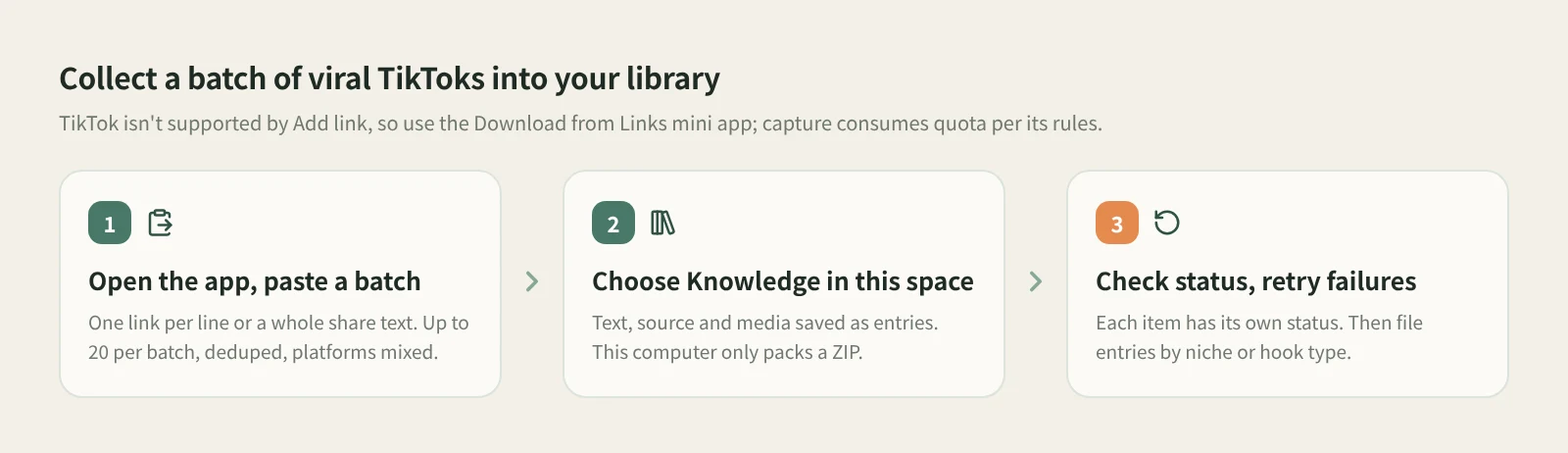
- Open Download from Links. Find it under Mini apps in Tools & Skills on the left. It opens in its own window, so the main window stays free.
- Paste a batch. Enter one post link per line, or paste a whole share text. Each batch takes up to 20 links, and duplicates are removed. TikTok links can be mixed with Xiaohongshu (RedNote), Douyin and WeChat Channels links.
- Choose Knowledge in this space. This saves the text, source and media, and each link becomes a knowledge base entry. This computer creates no entries and packs the text, images and videos into a ZIP, saved to Downloads by default, for when you only want the files.
- Check each item's status. Results are listed one by one, and failed or partially completed items can be retried individually. When packing to your computer, if some media fails to download, the ZIP includes a list of the missing files.
- Organize in the knowledge base. File the saved entries into folders by niche, product or hook type, so searching and comparing happen in one place.
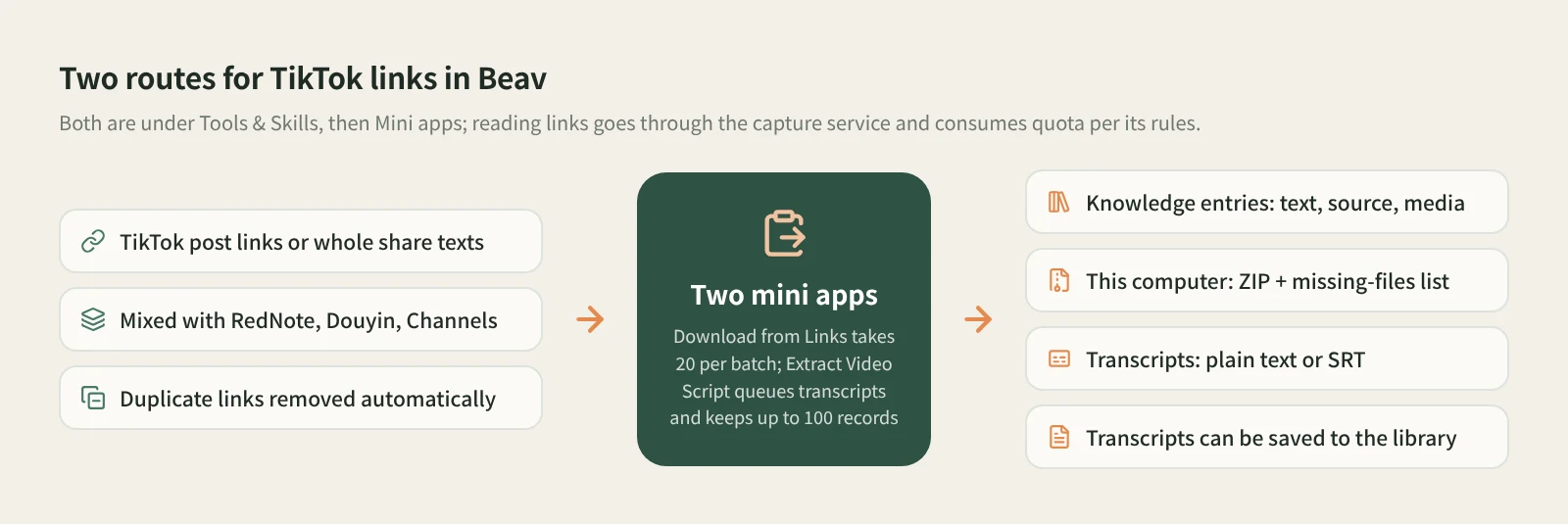
Only need the spoken words? Use Extract Video Script. Paste many TikTok links or share texts at once. The tool detects each platform, drops duplicates, queues them in order, downloads each video and transcribes it. Output is plain text by default, or SRT; choose to save to the knowledge base as well if you want to keep them. While it runs you can add links, copy finished transcripts, and pause or resume the rest of the queue. Up to 100 records are kept, and queued links survive closing the window. For competitive research, reading the openings of a few dozen hits side by side shows you what their hooks have in common fast. See extracting video transcripts in bulk.
What uses quota? Both mini apps read TikTok links through the capture service, which needs sign-in or a configured capture API and consumes quota according to its rules. Transcription in Extract Video Script also uses a transcription model. What you get depends on whether the link is accessible and on the capture service.
Other entry points. Add link in the knowledge base and phone link submission don't support TikTok at the moment, so use the two mini apps above.
To take saved videos apart later, open the entry in the knowledge base and click Decompose yourself. The full flow is in saving, breaking down and rewriting TikTok videos.
How it compares with the usual ways
| TikTok Favorites and built-in saving | Paste-a-link downloader sites | TikTok Creative Center | Beav reference library | |
|---|---|---|---|---|
| Strength | One tap, nothing to set up | Works straight from a web page | Trending hashtags, sounds and ad examples for spotting trends | Collecting benchmark videos you've already found, in batches |
| What you keep | A favorite on TikTok, or a video in your camera roll | A video file | Nothing to download | Knowledge base entries with video, text and source, or a ZIP |
| Batches | One at a time | Mostly one at a time | Not applicable | 20 per batch, duplicates removed, platforms mixed |
| If the creator deletes it | Favorites usually stop playing | File remains; you track the source | Not applicable | Saved media and source stay in your library |
| What comes next | Watch it again | Organize it yourself | Pick a direction | File, search, decompose, cite while writing |
| Cost | Free | Often free, or per the site's terms | Free | Capture consumes quota per its rules |
If you just want to watch something later, Favorites is the easiest, and when the creator allows downloads, built-in saving is one tap. To see what's trending right now, Creative Center has trend data Beav doesn't offer. Beav is for when you've already found a set of benchmark videos and want them in one library with their sources, next to material from other platforms, ready to compare and break down.
Limits and notes
- TikTok goes through the mini apps. Add link and phone link submission don't support it.
- Up to 20 per batch. Split longer lists into several batches. Extract Video Script keeps up to 100 records.
- This computer doesn't add to your library. The ZIP has the files, but no knowledge base entries are created, so you can't search or decompose them in Beav.
- Beav doesn't promise higher quality than the original, doesn't remove watermarks and never posts for you.
- Saved videos are for your own research. Get the creator's permission before cutting them into your own work, republishing or using them commercially.
Next steps
- To break down and rewrite the TikTok videos you've collected, read saving, breaking down and rewriting TikTok videos.
- To download links from several platforms in one go, read batch-downloading links from multiple platforms. For why collecting matters at all, read the series overview, "Accumulation Is the Moat".
- Full reference: built-in mini tools.
Applies to Beav desktop 2.9. Checked 2026-11-04.