Key takeaways
- Bilibili links reach Beav three ways: Add link under + in the knowledge base, submitting from your phone, or asking the AI in a chat. All three read through the capture service, which needs sign-in or a configured capture API and consumes quota according to its rules.
- Click Decompose in the details for a topic and structure. When the video itself is saved locally, you also get shots, a per-shot script and clips.
- AI rewrite brings the video into a new chat so you can learn how it is built and write your own. Bilibili is not currently supported by the Extract Video Script or Download from Links tools.
Good Bilibili videos tend to be long. A fifteen-minute explainer has a structure, an argument and examples worth studying. The usual habit is to favorite it or add it to Watch Later and come back some day. The thorough version is a downloader for the file plus an AI summary tool to read it. Either way, the material ends up split between the app, a folder and a chat log.
Beav saves a Bilibili video as one entry in your knowledge base, with the title, source, uploader and view count attached, and lets you decompose and rewrite it in the same place.
Who it is for
- Creators making explainers, reviews or tutorials who want to study how long Bilibili videos are structured.
- Marketers turning Bilibili ideas into image posts or short talking-head videos for other platforms.
- People who browse Bilibili on their phone and sort things out later on a computer.
Step 1: Save it
Pick any of the three entry points. Everything lands in the knowledge base of the space currently open in Beav.
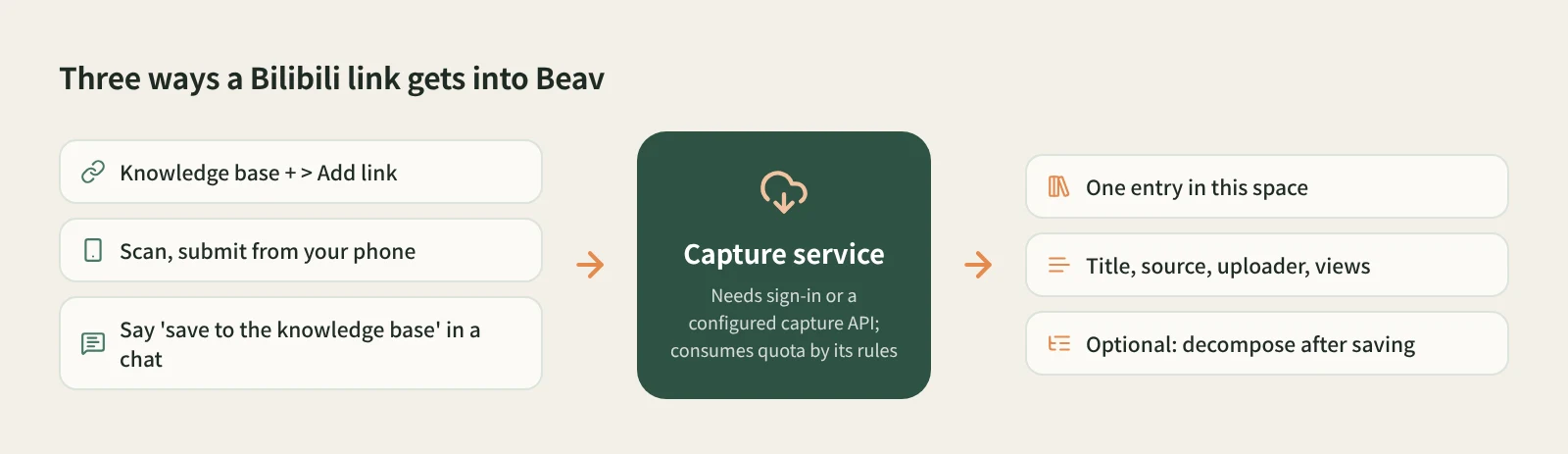
- On your computer: Add link. At the root of the knowledge base or in a personal folder, click + next to Knowledge Base, choose Add link, paste the video link or the whole share text (no need to pick a platform) and click Save. Beav resolves short links such as b23.tv and detects the platform. Links go in one at a time; after a success the box clears for the next one.
- On your phone: scan and submit. Click Phone Upload in the knowledge base. With the phone and computer on the same Wi-Fi, scan the code and pair, copy the share link in the Bilibili app, and submit it on the collection page, up to 50 links per batch. Placeholder cards appear on the computer first, then capture runs automatically. See phone and computer pairing for details.
- In a chat: ask the AI. Send the link in a chat and say "save to the knowledge base". The AI reads it and files it. Reading one specific link does not trigger a points confirmation.
- Tick the breakdown box if you want it. Break down into assets after saving in Add link and Decompose after saving on the phone page are off by default. When ticked, a successful save goes straight into the decomposition queue.
If you have connected an external agent to Beav on your computer, you can also ask it to resolve a Bilibili link and save it to the knowledge base. That uses Beav's social media tools and may consume Beav quota.
Only links to individual videos work; an uploader's profile link is rejected right away. A video already in the knowledge base is not saved twice.
Step 2: Decompose it
Open the video in the knowledge base and click Decompose. The result shows a topic, structure template, shots, a per-shot shooting script and a timed transcript, and the topic is added to the topic center.
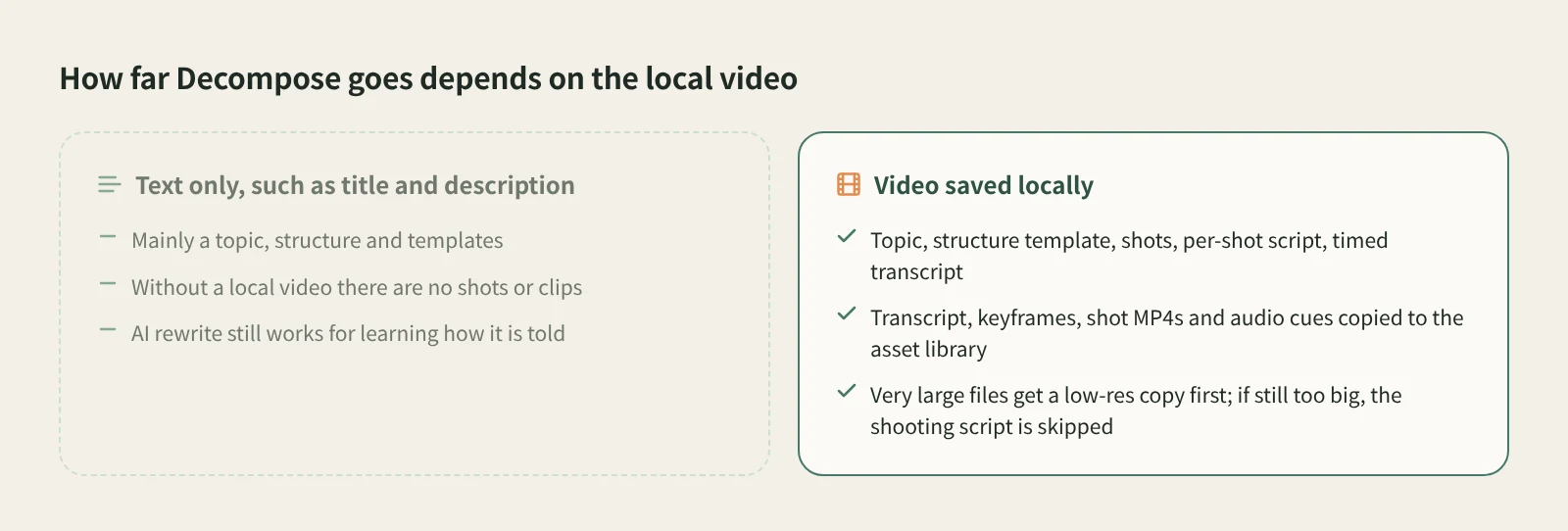
One condition matters: shots and clips can only be extracted from a video saved locally. When the entry's video is on your computer, decomposition copies the transcript, keyframes, shot MP4 clips and audio cues to the asset library, and you can merge a shot into the previous one or split at the playhead if a cut is off. When the entry only has text such as the title and description, decomposition mainly gives you a topic, structure and templates.
Long Bilibili videos also mean big files. Above the size limit for video understanding, Beav first makes a low-resolution copy; if that is still too large, it skips the shooting script and says why, and keeps the rest. Decomposition uses model quota, and a batch asks you to confirm the item count, video length and usage first. For shot-by-shot details, see how to break down a video shot by shot.
Step 3: Rewrite it
Open the details and click AI rewrite at the top right. Beav opens a new chat with a prefilled rewriting prompt, a reference to the video and the rewriting skill selected. Add your brief and send it yourself.
Long videos lend themselves to going short. For example: "Keep its 'common mistake, three counterexamples, conclusion' order and turn it into a six-page image post for beginners." Say what to keep, what to change and whether you want an image post or a video; the assistant first explains how the original is organized, then proposes how the new piece maps onto it. Rewriting uses the chat model.
How it compares with the usual tools
| Bilibili favorites, Watch Later, app cache | Downloaders such as BBDown or you-get | AI summary tools such as BibiGPT | Beav | |
|---|---|---|---|---|
| What you get | A bookmark in your account or a cache inside the app | Video files with a choice of quality | A summary, key points, Q&A | A knowledge base entry with title, source, uploader, view count |
| Strengths | Effortless while browsing | Flexible bulk, high-resolution and series downloads | Understanding a long video fast | Structure and script you can rewrite from |
| If the video goes away | The bookmark breaks | Files remain | Depends on whether the tool keeps a record | What you saved remains |
| What comes next | Watch it again | Organize or edit it yourself | Ask follow-up questions | Decompose, AI rewrite, drag it into a chat to cite |
| Cost | Free, some features need membership | Open-source tools are free | Each tool's own terms | Capture uses quota by its rules; decomposition and rewriting use model quota |
If you just want to watch it again, favorites and the cache are enough. For high-resolution files or a whole series, a dedicated downloader is the better fit. To know what a long video says in five minutes, an AI summary tool is fastest. Beav is for videos you plan to take apart and learn from before writing your own.
Limits and notes
- Extract Video Script supports Douyin, WeChat Channels and TikTok, and Download from Links supports Xiaohongshu, Douyin, WeChat Channels and TikTok (YouTube to the knowledge base only). For Bilibili, use the three entry points above.
- What can be captured depends on the platform, the capture service, account access and quota. "Received" on the phone means the computer has the task, not that the video and transcript are done.
- Phone submission needs the phone and computer on the same local network; it does not work over cellular. Keep Beav running and the computer awake.
- Saved videos are for study and research. Get the uploader's permission before cutting them into your work, reposting or commercial use.
Next steps
- For every platform Add link supports, see paste a link and Beav saves it.
- More on saving from a chat: drop a link into an AI chat and have it filed.
- Full reference: add a link to save a single post and decompose videos and notes.
Applies to Beav desktop 2.9. Checked 2026-10-21.