

Key takeaways
- Save a Douyin video to the knowledge base, let it finish downloading, then click Decompose on it. One run gives you four things: a per-shot shooting script (the script), shot cuts with MP4 clips (the shots), a timed transcript (the audio) and M4A music cues (the music), plus a topic and a structure template.
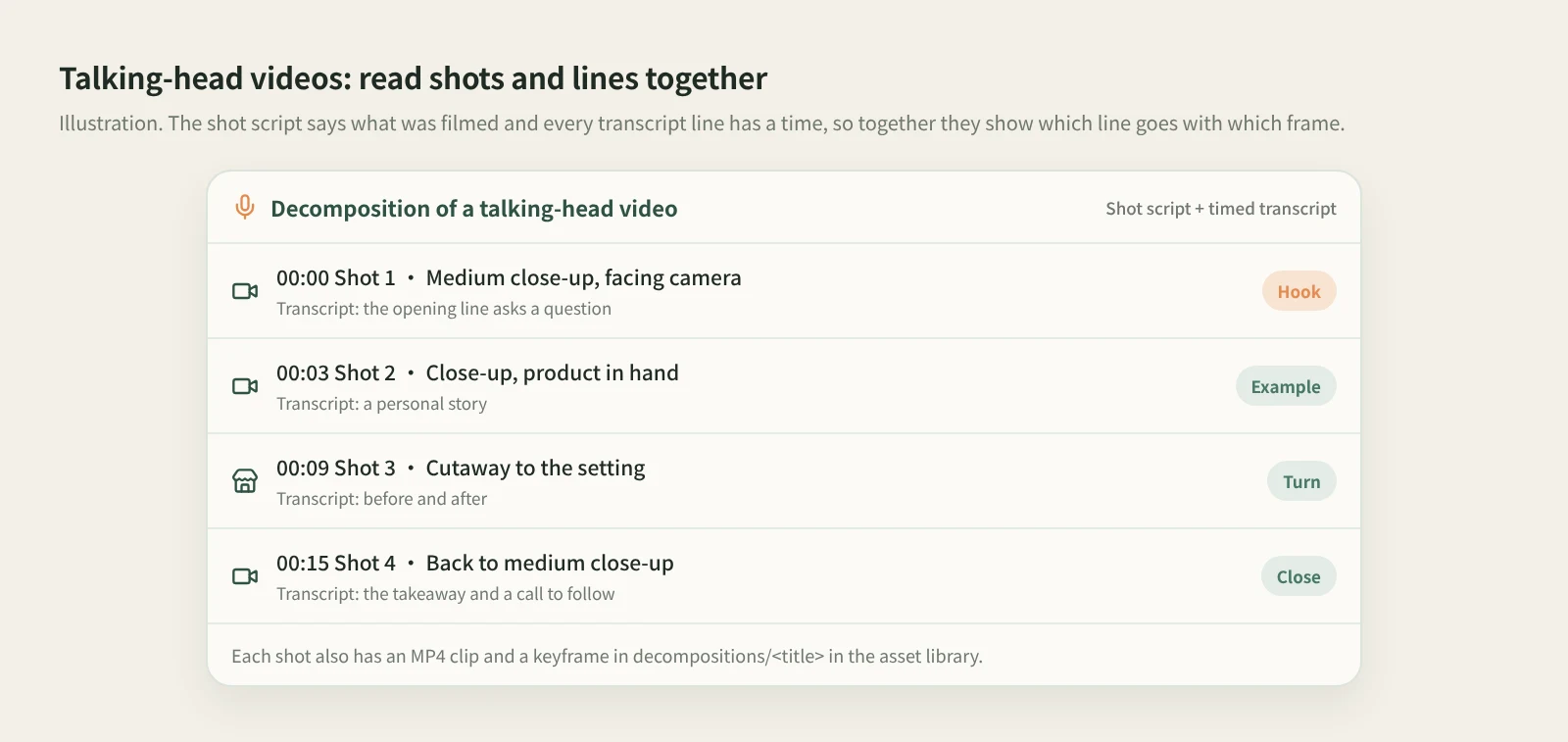
- For talking-head videos, the transcript and the shot script are the pieces to study: every line has a timestamp and every shot says what was filmed, so you can see which line goes with which frame. For skits and local-review videos, the shot cuts and clips tell you more.
- Everything is copied to
decompositions/<title>in the asset library, and the origin panel keeps the source video, author and time range. Decomposition only runs when you start it and uses model quota. Music cues come from ranges with sound but no speech, so they may include ambient sound; this is not vocal separation.
On Douyin, the craft of a good video hides in the details: the second the opening line stops, the moment it cuts to a product close-up, where a skit flips, whether a restaurant visit opens on the storefront or the food. You won't catch it in one viewing. Learning from it usually means scrubbing back and forth and taking notes.
In Beav, all of that is one Decompose. The shot script, clips, transcript and music land in the asset library, and each piece remembers which video and which seconds it came from. Saving is the first step of building a material library. Breaking things down is the second: a video you scrolled past becomes parts you can pull into your next shoot.
Who it is for
- Douyin creators making talking-head and explainer videos who want to learn how benchmark accounts open, pace their lines and close.
- Directors of skits and local-review videos studying shot order and transition rhythm.
- Social media managers who hand shot lists to a team, or want to keep good clips and music as reference.
How to use it
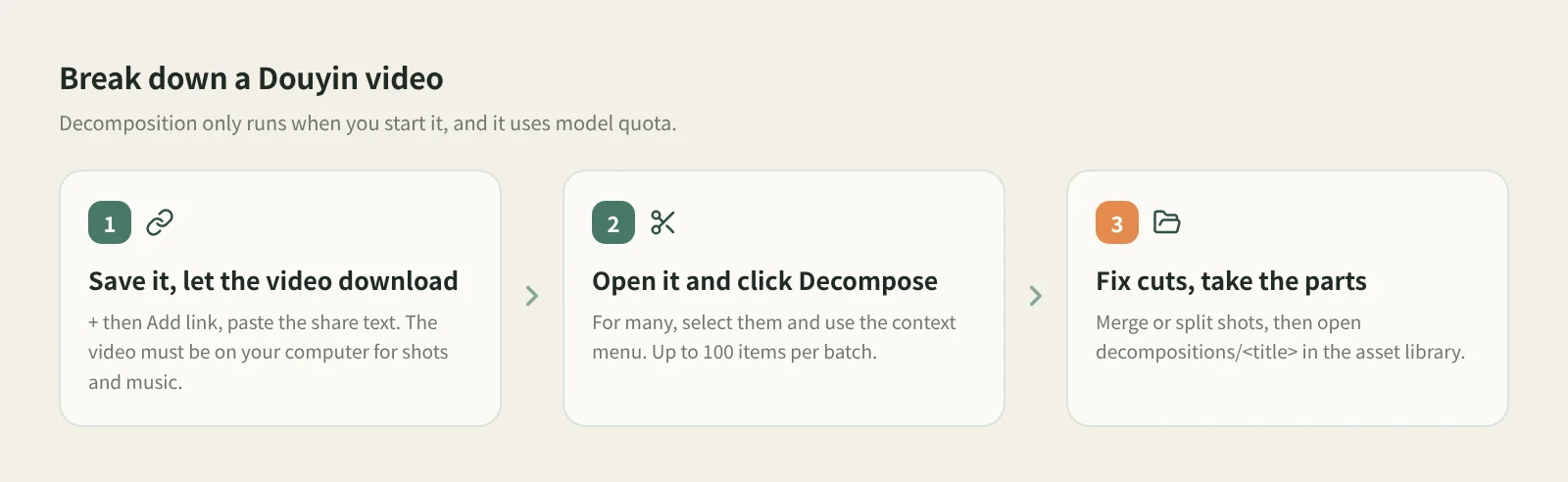
- Save the video first. In the knowledge base, click + next to Knowledge Base, choose Add link and paste the Douyin share text. The walkthrough is in saving Douyin videos to a reference library. Saving never starts a breakdown.
- Wait for the download. A card showing Downloading is still pulling the video in the background. The video has to be on your computer before Beav can cut shots, make clips or pull music.
- Open the item and click Decompose. For a batch, select items in the list, open the context menu and confirm the item count, video duration and model usage. A batch takes up to 100 items.
- Check the cuts against the video. Click a shot thumbnail or timestamp and the video jumps there. If two shots are really one, merge it into the previous shot; if a shot hides a transition, play to that point and split there. Later runs keep your cuts.
- Take the parts from the asset library. Open
decompositions/<title>in the asset library for the transcript text, keyframes, shot MP4 clips and M4A music cues. The topic also goes to the topic center.
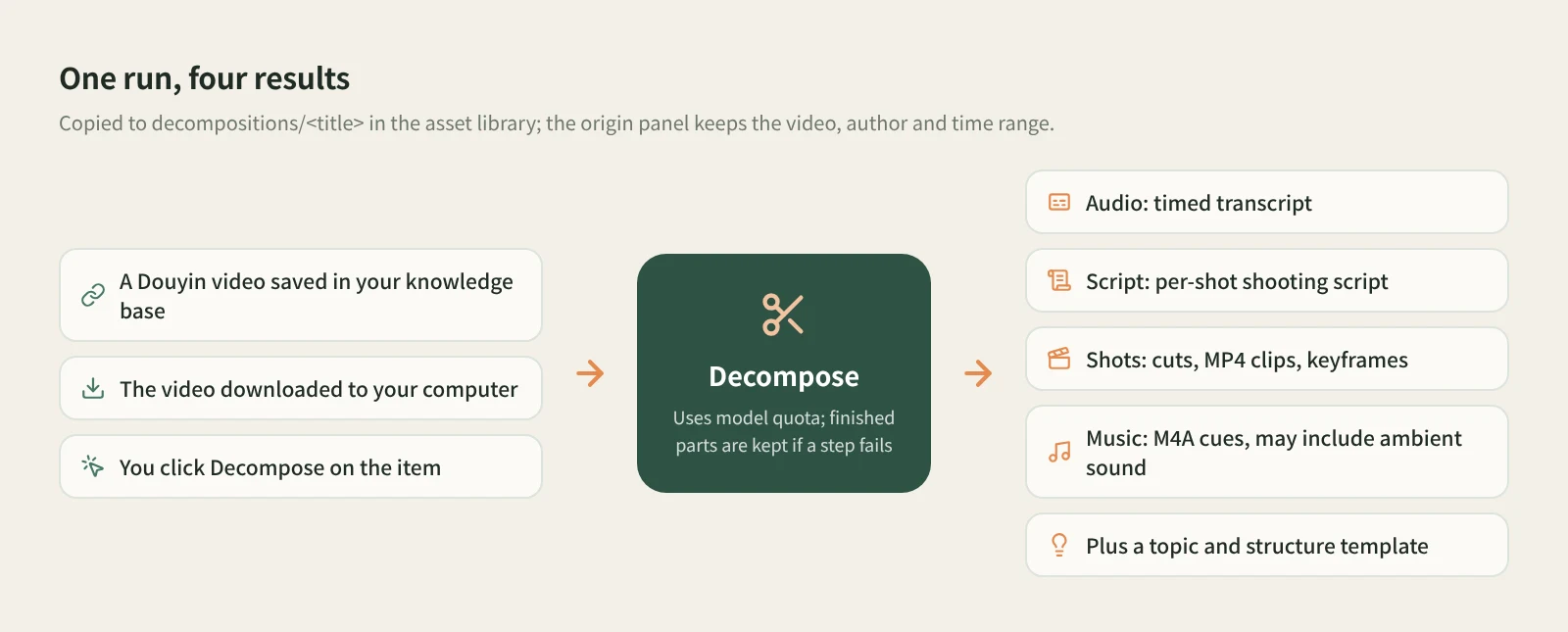
The audio: a timed transcript. Every spoken line becomes text with its own timestamp. For a talking-head video this is usually the most useful piece: you can see how many seconds the hook takes, where the example comes in, and where the call to follow lands. Use it to learn the order and pacing, then write your script in your own words.
The script: a per-shot shooting script. Each shot in order, with what it shows and how it was filmed. A talking-head video can look like one person talking the whole time, yet the framing, angle and cutaways keep changing, and the shot script lists every change. Read it next to the transcript and you see which line gets a close-up and which one cuts to the product.
The shots: cuts and MP4 clips. The video is cut shot by shot, with an MP4 clip and a keyframe for each. A skit's twist or a restaurant video's walk-in and first dish are far clearer in a clip than in words. After you adjust cuts, decompose again to get new clips; the old clips are not deleted.
The music: M4A cues. Beav takes the ranges where there is sound but nobody is talking and saves them as M4A. They may include ambient sound, and vocals and music are not separated. In a restaurant video that is often the room itself, so listen before you decide how to use it.
Two more: a topic and a structure template. The topic goes to the topic center. The structure template shows how the video opens, where it turns and how it ends.
What uses quota? Saving a Douyin video through Add link goes through the capture service, which consumes quota according to its rules. Decomposition then uses model quota: the transcript, topic and structure, and shooting script rely on transcription, chat and video-understanding models respectively.
How it compares with the usual ways
| Breaking it down by hand | CapCut auto captions | A separate music-ripping tool | Beav Decompose | |
|---|---|---|---|---|
| Strength | Deepest understanding; every call is your own | Captions land on your timeline, ready to edit | Built for audio; some identify the song or separate vocals | Script, shots, transcript and music in one run |
| Time | A long session per video | Quick once the video is imported | One video at a time | One click, then wait |
| What you get | Your notes and screenshots | Caption text | An audio file | Shot script, MP4 clips, keyframes, timed transcript, M4A music cues, topic, structure template |
| Source | You track it | Lives in the edit project | Usually you track it | Origin panel keeps the video, author and time range |
| Later use | Dig through notes | Used in that project | Sits in a folder | Find it in the asset library, drag it into a chat |
| Cost | Free, but slow | Per CapCut's own terms | Depends on the tool | Model quota |
Breaking a video down by hand is still the surest way to understand it, and you should look over what Beav produces and decide for yourself why the video works. For captioning your own footage, CapCut's auto captions are the smoother choice. If you need the song's name or a clean instrumental, a dedicated audio tool fits better: Beav doesn't identify songs or separate vocals. Beav is for breaking down a batch of benchmark videos and building the results into a library you can search.
Limits and notes
- The video has to be on your computer. Items still downloading, or whose download failed, can't produce shots, clips or music. For Douyin, Beav saves and decomposes single videos.
- Results can be partial. Check the reasons at the bottom of the result, the media download progress and your model setup. If one step fails, the finished parts are kept. Video over the video-understanding size limit is first compressed to a low-resolution copy; if it's still too large, the shooting script is skipped and the reason is shown.
- Running it again won't overwrite your edits. Versions you changed in the asset library are kept, and changed outputs are saved as new copies. Shared spaces don't offer Decompose.
- What you break down is for your own study. Rewriting should learn structure and rhythm, not lift footage or lines. Get permission before publishing or commercial use of clips, keyframes or music.
Next steps
- To turn a broken-down video into your own voiceover script and shot list, read Douyin breakdown and rewriting.
- For more on video breakdowns, see how to break down a viral video. For why collecting matters at all, read the series overview, "Accumulation Is the Moat".
- Full reference: decompose videos and notes.
Applies to Beav desktop 2.9. Checked 2026-11-01.