

Key takeaways
- Open your own account under Account profile, click Sync recent posts, pick 1–10 pages (about 20 posts per page), read the points reminder and confirm. Your posts, likes and saves land in Beav.
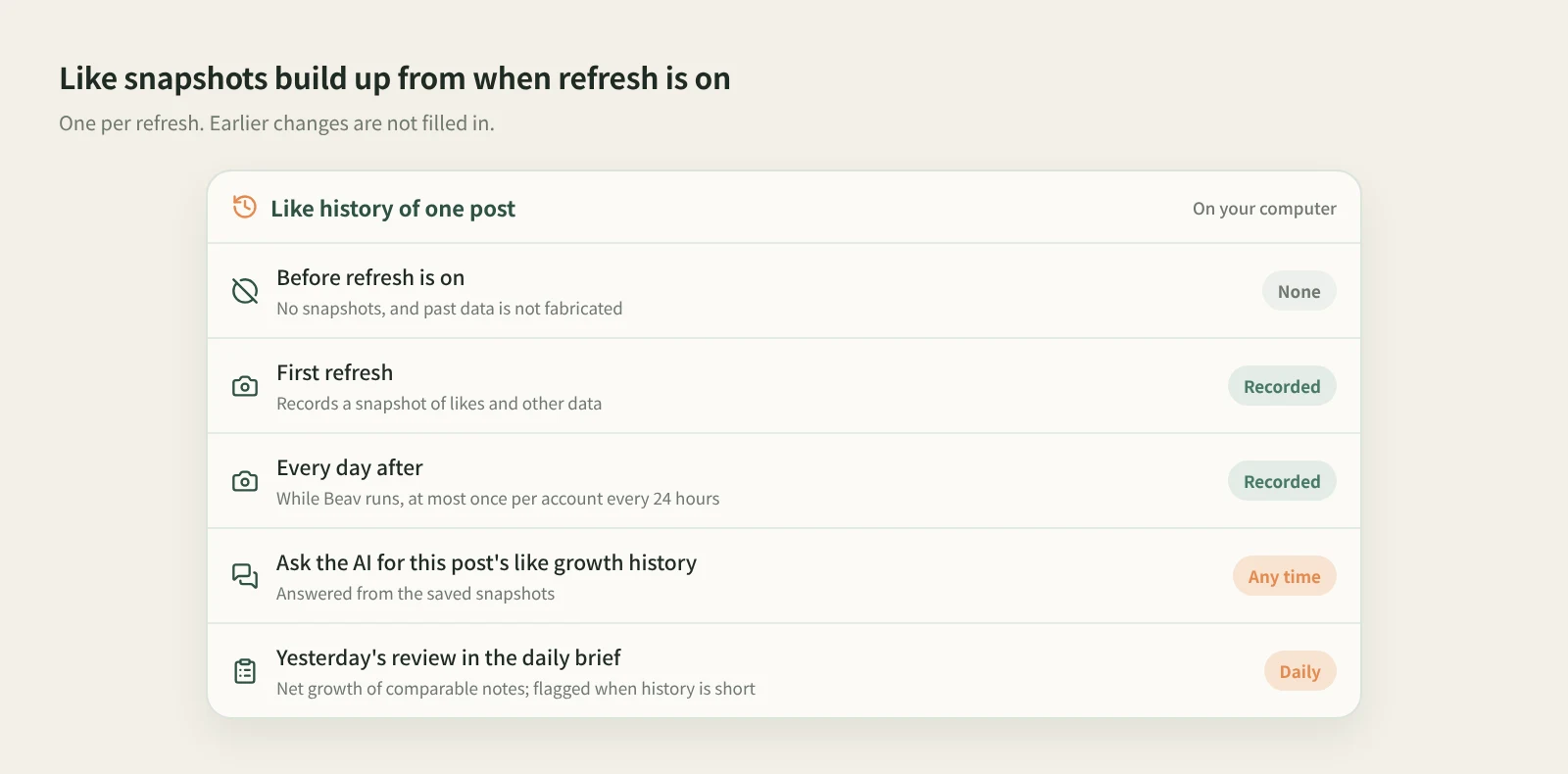
- Settings › General › Scheduled account archive refresh is on by default. While Beav is running it refreshes each account at most once every 24 hours and records a snapshot of likes and other data each time.
- Snapshots stay on your computer. Ask the AI for "the like growth history of this note", and the daily brief's Yesterday's review reads the same history. Snapshots only build up from when refresh is on; past data is not filled in.
Most creators review their own posts by opening the platform's creator dashboard every few days, or by copying like counts into a spreadsheet. The spreadsheet usually stops after a week. Then, when you want to know whether a post took off on day two or got picked up a week later, all you have is today's number.
Beav account profiles take a different approach: they sync your own account's posts to your computer and keep a like snapshot every day. Give it a few weeks and every post has a growth record you can ask about.
Who it is for
- Creators running their own accounts who want to see which posts keep growing and which spike for a day.
- People who read the daily brief and want Yesterday's review to compare real numbers.
- Marketers managing several of their own accounts in one space who want all those posts in one place.
How to use it
Set up a space in Beav first. An account profile holds your own account's posts. To look at someone else's account, use social media research; to follow benchmark creators, use subscriptions. Don't add other people as your account profile.
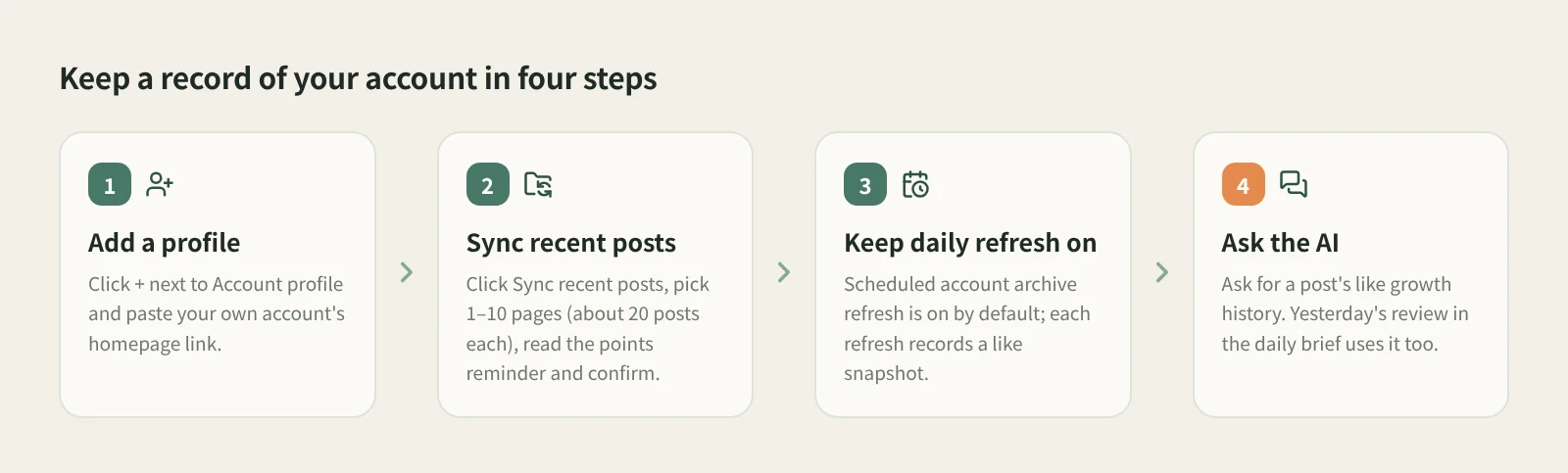
- Add an account profile. Click + to the right of Account profile on the left and paste the account's homepage link. You can paste the whole share text: Beav keeps only the link and shows the detected platform's icon. Xiaohongshu (RedNote), Douyin and Bilibili share short links are resolved to the account homepage first; resolving reads the account info once and may use credits. Which platforms you can add, and how much can be read, follow the prompt in the add dialog.
- Sync recent posts. Open the account under Account profile, click Sync recent posts on the right of the title row, set 1–10 pages (about 20 posts per page), read the points reminder and click Sync. Progress is shown while it runs; if it fails partway, what was already written is kept.
- Read the result correctly. Sync reads the platform's recent content list, which may include pinned posts. Existing posts only get their engagement data updated, and only new posts have their details read, so syncing 40 posts does not mean 40 new ones. Each card shows likes and saves at the bottom, with "—" when the platform returns no like count. Switch between gallery and timeline in the title bar; the timeline is sorted by publish time, newest first.
- Keep daily refresh on. Check Settings › General › Scheduled account archive refresh. It is on by default at about 20 posts (1 page) per account per day; you can set 20–200 posts (1–10 pages) or turn it off. While Beav is running it checks accounts with profiles in all spaces and refreshes each one at most once every 24 hours, with no need to open the profile page or switch spaces.
- Ask the AI for growth history. Each refresh records a snapshot of likes and other data. Later, ask in a chat to "show the like growth history of this note". You can also tell the AI to "refresh the current account's data", "sync the last two pages of notes", or "read a few dozen more posts from the current account and categorize them"; it runs after you confirm the points.
The history also feeds your daily brief. Yesterday's review reads the like history saved for your own account, shows the net growth of comparable notes in a table and sums up lessons you can reuse. When the history is too short or covers only some notes, the brief says so.
How it compares with creator dashboards and analytics platforms
| Platform creator dashboard | Third-party analytics platform | Beav account profile | |
|---|---|---|---|
| Where the data lives | In your platform account | On the provider's website | In your Beav space, on your computer |
| What you see | Official platform metrics, usually the fullest set | Rankings, competitors and account comparisons | Your own posts, plus likes, saves and other engagement data |
| Past data | The platform keeps its own history | Depends on what the provider tracked | Only builds up from when refresh is on |
| Looking back | Open the dashboard and check item by item | Read reports on the site | Ask the AI for a post's like growth history |
| Link to your writing | You note the takeaways yourself | You note the takeaways yourself | Posts sit in the same space, so the brief's review and your drafts can use them |
| Cost | Free | Usually paid | Points reminder before syncing; runs after you confirm |
The creator dashboard is the authoritative source. Beav does not replace its official metrics or the history the platform keeps. Analytics platforms are good at the wider market and other accounts, which makes them the right tool for competitor research. Beav account profiles do a narrower job: they keep your own posts and their day-by-day like changes on your machine, so the AI can cite them when it writes your brief, reviews yesterday, or helps with the next post.
Limits and notes
- No backfill. Snapshots build up from when refresh is enabled; past data is not fabricated. If you want a full growth curve, turn it on early.
- Beav has to be running. Daily refresh is a local task, not a cloud scheduled task. It does not run while Beav is fully quit and catches up on what is due after the next launch.
- Syncing asks for points. A manual sync shows a points reminder first, and an AI-run sync waits for you to confirm the points. Resolving a share short link when adding a profile may use credits. To keep reads down, leave daily refresh at the default 1 page or turn it off.
- Synced is not the same as new. Existing posts only get engagement updates, and the list may include pinned posts.
- Your own accounts only. For other accounts, use social media research or subscriptions.
Next steps
- To see how Yesterday's review reads and what else is in the brief, read the daily ops report.
- To keep up with benchmark creators' new posts, read subscribing to benchmark creators.
- Full details are in the docs: Links, subscriptions, and account profiles.
Applies to Beav desktop 2.9. Checked 2026-10-24.