

Key takeaways
- Keep only your own channel in Account profiles: Click Account profiles → + and check supported platforms and depth prompts inside the modal (never add competitors here—track peers under Subscriptions instead).
- Daily snapshots capture momentum: Sync 1–10 pages (~20 posts per page) manually or enable Settings → General → Scheduled account archive refresh so Beav logs one local snapshot every 24 hours while running.
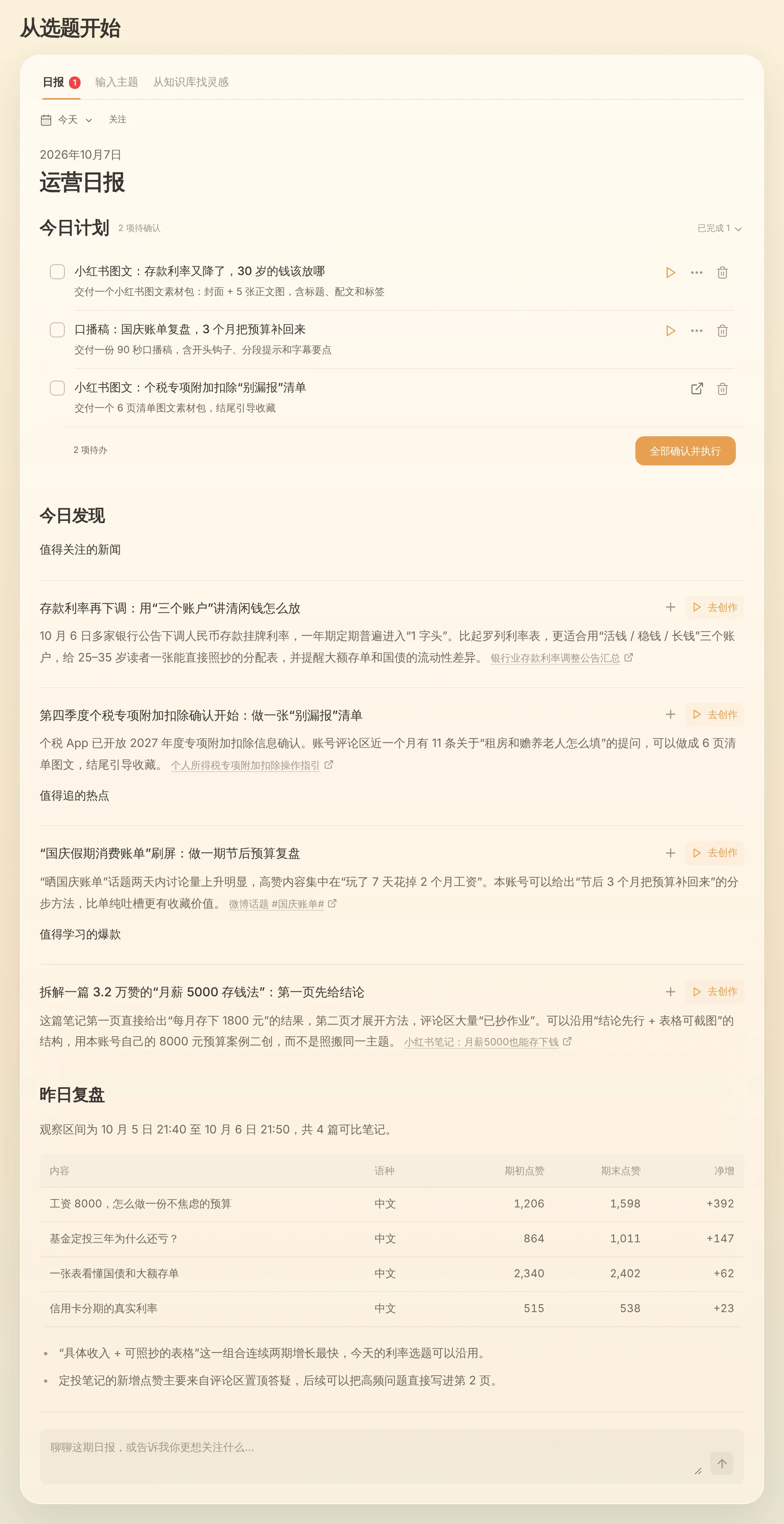
- Reviews live right beside drafting: Daily snapshots feed your 09:00 Yesterday's review table, Creation → Review (2.10.7), and chat growth queries, complementing official retention and reach metrics in TikTok Studio.
TikTok Studio shows live views, average watch time, and traffic sources—but checking week-over-week like momentum on specific hooks across thirty uploads still forces creators into manual spreadsheets that break after three days.
Beav Account profiles solves the other half: pairing a local daily snapshot of your published posts and likes right alongside your scripts, product cards, and reference library so lessons turn directly into tomorrow's opening hook.
Who it is for
- TikTok operators comparing whether specific hooks spike immediately on day one or climb steadily via search over days three through seven.
- Creators wanting the morning daily ops report to highlight standout net gains automatically before drafting begins.
- Teams running separate niche accounts who want performance snapshots kept inside the exact space that holds each channel's scripts.
How to use it
- Add your own channel under Account profiles. Click + next to Account profiles in the left navigation and paste your profile URL; follow the modal's prompt for currently supported platforms and sync boundaries. Always put competitor accounts in Subscriptions or social research instead.
- Run an initial sync (1–10 pages). Open the profile and click Sync recent posts (1–10 pages, ~20 posts each), confirming the credit notice first. Existing items only refresh engagement counts while new ones fetch details; missing platform fields display
—. - Keep daily scheduled refresh enabled. Check Settings → General → Scheduled account archive refresh (on by default, configurable 1–10 pages). While Beav is running, it updates profiled accounts at most once per 24 hours and stores a fresh engagement snapshot locally.
- Turn snapshots into clear lessons across three views:
- Ask in chat: Ask "show the like growth history for this post" or tell the AI to group your last 20 uploads by opening hook type and contrast top performers against misses.
- Read Yesterday's review at 09:00: The morning brief tabulates net gains on comparable posts and highlights reusable takeaways (truthfully flagging when snapshot history is still short).
- Review lessons under Creation → Review (2.10.7): Inspect review summaries and choose which proven rules to save into ongoing space guidance. See daily ops report.
How Beav complements TikTok Studio and third-party analytics
| TikTok Studio / Official Analytics | Third-party analytics sites | Beav Account profiles | |
|---|---|---|---|
| Authoritative scope | Views, 2-second drop-off, watch time, audience geography, traffic sources | Public hashtag charts, creator ranking leaderboards | Local copy of your captions/covers + daily like & save snapshots |
| Historical tracking | Rolling window charts; hard to tie to drafts | Public curve estimates by subscription tier | Logs daily per-post delta forward from when refresh is turned on |
| Link to production | Insights stay outside your drafting tool | Separate spreadsheet export workflow | Posts live in the same workspace so insights feed directly into new scripts |
| Cost & setup | Free inside official account | Paid web SaaS plans | Credit notice shown cleanly before sync runs |
For views, retention drop-off curves, and For You vs Search traffic splits, TikTok Studio remains essential. You can also paste official TikTok Studio metrics straight into a Beav chat whenever you want the AI to diagnose why one script retained longer than another.
Limits and notes
- No historical backfill. Snapshots start building on the day you enable refresh; turn it on early when launching a channel.
- Runs locally while Beav is open. Completely closing Beav pauses background refreshes (and avoids burning credits); missed windows catch up next time the app runs.
- Control credit spend. Keep daily refresh on 1 page (~20 posts) to monitor recent uploads efficiently without unnecessary API calls, and follow live platform support shown in the modal.
Next steps
- Need peer benchmarks alongside your own data? Read TikTok competitor subscription.
- Ready to revise your next video around winning lessons? Read TikTok full content package.
- Shared account-archive documentation: Account profile sync & like history and TikTok operation guide.
Applies to Beav desktop 2.9 and later; Creation → Review is available from 2.10.7.