


Key takeaways
- Open Hotspots in Beav's left navigation and authorize NewsBing to see overall and per-platform trends. The default For Me view ranks them by estimated fit with the current space's account profile, combined with popularity.
- Hover over a trend and choose Discuss with AI. Beav starts a chat with the trend and its sources; the AI checks the sources first, then talks through angles that suit your account.
- Note the angle you settle on in the Topic pool on Home, where you can keep discussing it or start creating. In library mode, the button on each trend is Save as topic.
Scroll through a trending list in the morning and you can read fifty headlines without finding one that fits your account. When something does look promising, you still have to work out whether your account can cover it, from which angle, and whether there is anything behind the headline. Then the idea goes into a notes app and is gone by the weekend.
Beav's Hotspots page puts those steps together: it ranks trends against your account first, lets you discuss an angle with the sources at hand, and keeps the result in your topic pool.
Who it is for
- Creators who need a topic every day and don't want unrelated trends eating the morning.
- Marketers running a niche account who keep asking whether a trend has anything to do with them.
- Anyone managing several account spaces who wants each account to see its own ranking.
How to use it
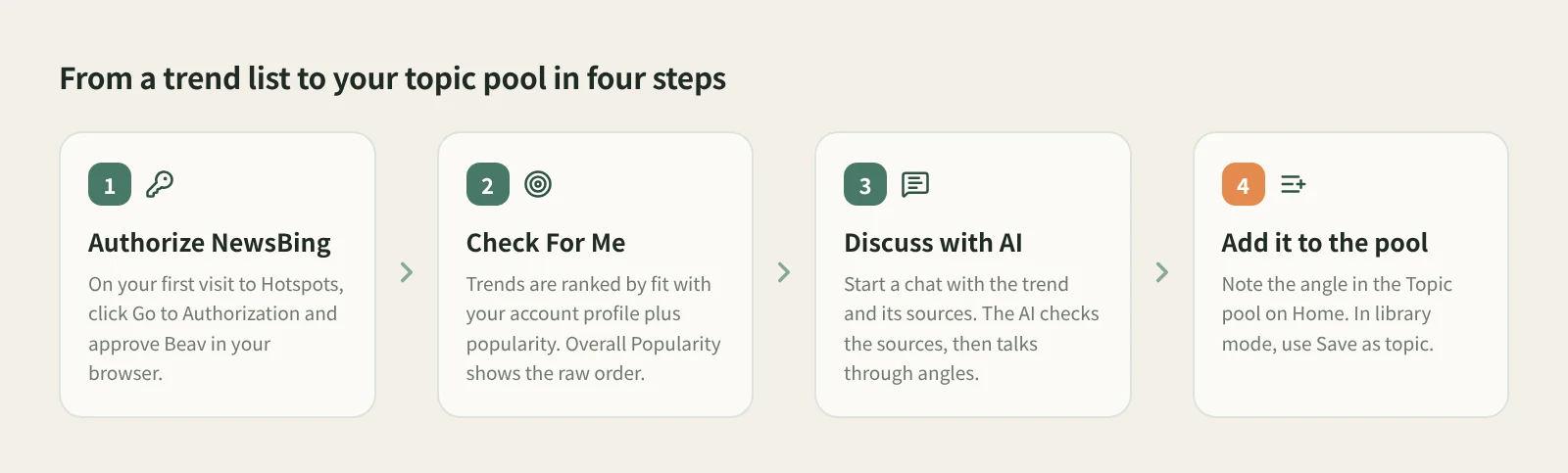
- Authorize NewsBing. Open Hotspots in the left navigation. The first visit shows no rankings, so click Go to Authorization, sign up or sign in to NewsBing in your browser, then choose Authorize Beav. The page tries to take you back to the desktop app, and you never need to copy an API key. If it doesn't return, copy the authorization link shown on the page and use the fallback link on Beav's Hotspots page. The link must come from the current, unexpired request.
- Check the space, then read For Me. The main list opens on For Me, ranked against the current space's account profile, so each account space sees its own order. Scores and stars help you choose; hover over a score to see its popularity and relevance parts. Switch to Overall Popularity for NewsBing's original order.
- Use the platform cards and tags. Platform cards on the right show trends from individual platforms. Select a trend in the main list to bring related platform cards forward and highlight them; select it again to clear. An orange Rising tag means 3–4 platforms cover the trend, and a red Viral tag means 5 or more. Open a source or platform entry to read the original page.
- Choose Discuss with AI. Hover over a trend to reveal Discuss with AI. Beav starts a chat with the trend and its available sources. The AI first checks the trend and its original sources, then discusses angles that fit your account. It doesn't start writing on its own.
- Keep the angle in the Topic pool. Back on Home, type the topic at the top of the Topic pool and press Enter, or paste several at once. Each topic has Continue discussion, Start creating and Discard on its right. In library mode, the trend list shows Save as topic instead of Discuss with AI, which saves the trend's title and source links as a topic in one click.
- Refresh when you need to. The main list title shows when the rankings were updated. Reopening the page shows the last successful result while it refreshes in the background; use the refresh icon on the right of the window title bar to update right away.
Once you have a direction, carry on with From capture to draft to gather references, shape the structure and write.
How it compares with trend aggregators and platform charts
| Trend aggregators (e.g. Tophub) | Weibo Hot Search and other platform charts | Beav Hotspots | |
|---|---|---|---|
| What you see | Many sites' charts on one page | One platform's live trends | Overall trends plus platform charts, from NewsBing |
| Ranking | Each chart's own order | The platform's own rules | Fit with your account plus popularity, or Overall Popularity |
| Fit with your account | Your call | Your call | Estimated from the current space's account profile |
| Afterwards | Think up an angle and note it yourself | Think up an angle and note it yourself | Discuss with AI with sources attached, then the Topic pool |
| What you need | A browser or app | The platform's app or site | The Beav desktop app and a NewsBing authorization |
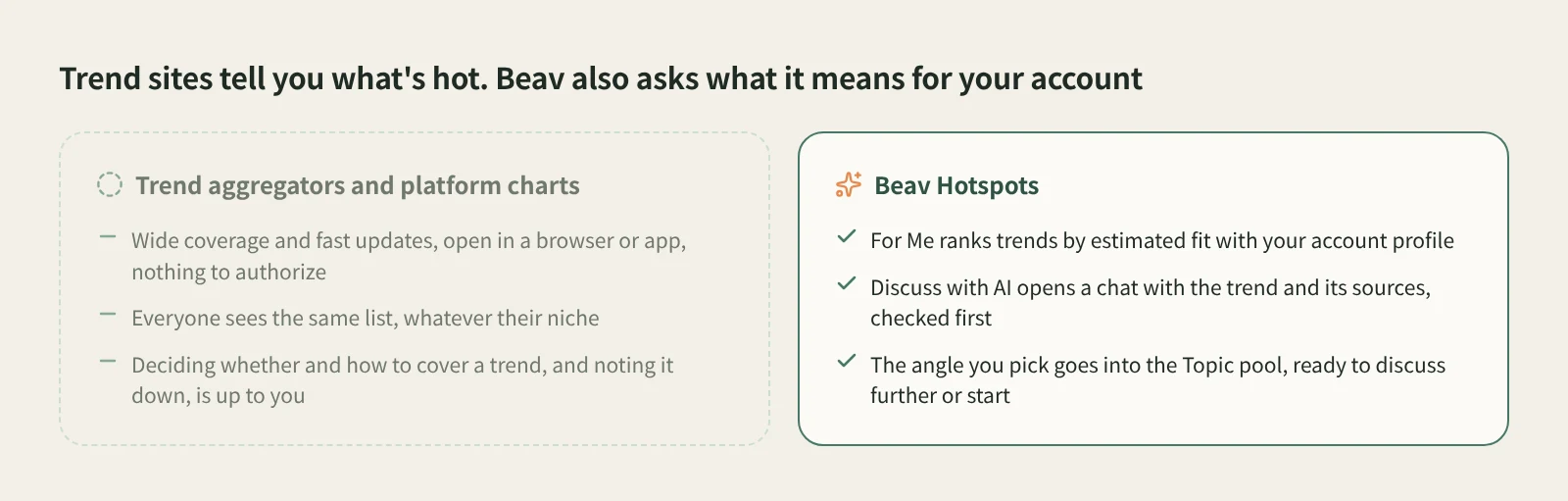
Aggregators cover a lot of ground, need no install or authorization, and are easy to check on a phone. Platform charts such as Weibo Hot Search are where trends start, update fastest and carry the liveliest comments. If you only want to know what is hot right now, they do the job. Beav Hotspots is about the part that comes after: does this trend matter to my account, which angle should I take, where do I check the facts before I commit, and where does the idea live once I've decided.
Limits and things to know
- The Hotspots page needs NewsBing authorization. Without it, the page shows no rankings. The daily brief on Home is different: without authorization it uses public trends that need no key, and with a personal key it reads NewsBing's trend snapshot. The brief has its own article; for now, see Daily brief and today's plan.
- Relevance is not fact-checking. The relevance score is estimated from the trend title and your account profile only, and it doesn't verify the event. Read the original source before relying on specifics, and don't judge from the headline when a source won't open.
- A failed refresh leaves the old list. You can still read it, but it may be out of date, so watch the update time next to the list title.
- Managing access. In the more menu on the right of the window title bar, Manage Authorization takes you to NewsBing to revoke the key. Disconnect removes the local connection and the cached rankings for this Beav account. To invalidate the key on every device, revoke it in NewsBing too. If authorization expires, revoke the old key and authorize again.
- Fill in your account profile. For Me depends on the current space's account profile; the clearer it is, the more useful the ranking.
Next steps
- Topic decided and want to learn from a strong post without just swapping words? Read AI rewriting that isn't just swapping words.
- To keep up with benchmark creators, read Track a benchmark creator's new posts.
- Full details are in the docs: Explore trends and start a discussion.
Applies to Beav desktop 2.9, checked on 2026-10-22.